How to create music on AI Moldova: a practical guide to prompts, lyrics and MP3
A guide from the AI Moldova team, with real studio screenshots, original prompt examples and clear steps for creating, reviewing and downloading your music.
Start with an intention rather than a list of effects
A useful piece of music begins before you press Generate. Decide what it should do: accompany a presentation, express a feeling, create the atmosphere of a café or turn a personal message into a song. From the perspective of the team operating AI Moldova, this is the most practical starting point. The tool proposes interpretations; you provide the direction and decide whether a result serves your project.
This guide follows the controls available in our music studio. We move from a written description to settings, lyrics, the cost estimate and listening to the result. The screenshots show the real AI Moldova interface in Romanian, with demonstration text entered into its fields. They explain the workflow rather than claim that a particular track has already been generated. You can use the same steps with your own subject, language and musical preferences.
1. Open the studio and listen to a few examples
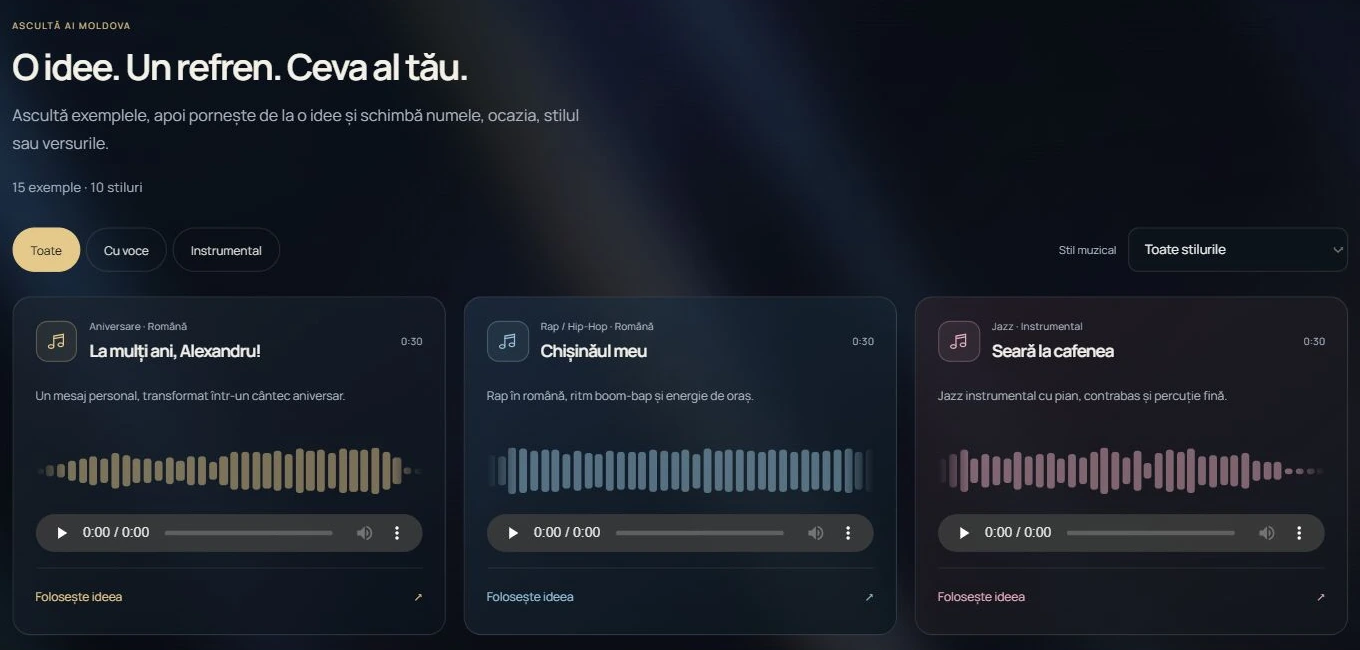
Choose AI Music in the website menu. Creating music and accessing your personal library require signing in. To explore first, open the example section and compare vocal tracks with instrumentals. Filter by musical style and listen for differences in energy, instrumentation and the space left for a voice. A gentle jazz example and a lively pop track can suggest very different directions for the same presentation.
Use the idea fills the form from the selected example; it does not start a generation by itself. Change the occasion, names, theme and instructions that do not suit your project. Treat an example as a starting direction rather than a promise of an identical recording. Personalize a birthday message before checking the price. If you want background music without singing, keep the voice setting instrumental and make your description consistent with that choice.
2. Choose a format that suits the project
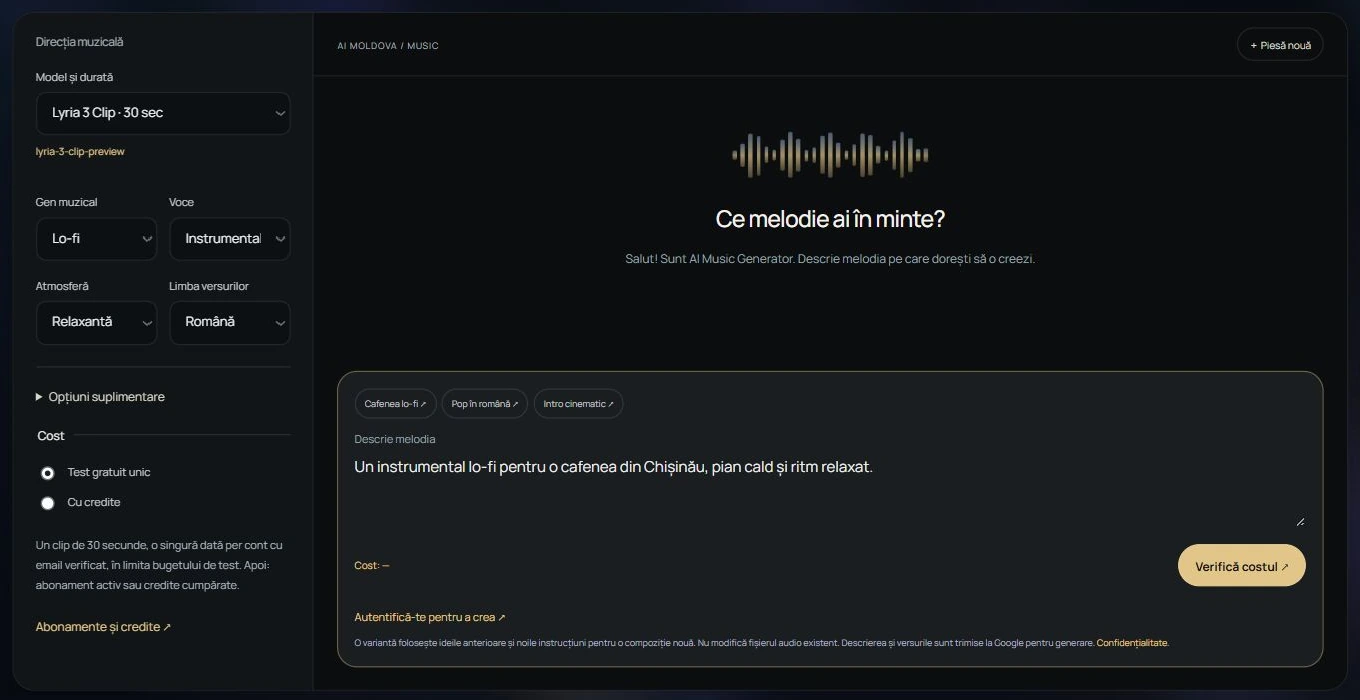
The Model and duration list offers a 30-second clip and a full track, described in the interface as approximately two minutes. A clip is a practical place to explore an intro or a short musical atmosphere. For a song with a verse, chorus and development, select the full track and describe the structure you want. The options have different costs, which you review before confirming the request.
Treat duration and timing instructions as creative guidance. If your advert must last exactly 20 seconds, listen to the file and plan an editing step. Do not assume that a particular word will be sung at the precise second requested. A usable result also needs a workable opening, sensible transitions and an ending that fits the material. Evaluate these parts in the context of your actual video or presentation.
3. Describe what the listener should hear
A helpful prompt answers five questions: what the project is for, which style you want, what emotion it should convey, which instruments matter and how the piece should develop. You do not need specialist musical vocabulary. Warm piano, restrained percussion and a quiet opening give more direction than asking for something amazing. Put the main idea first, then add only details that support it.
Avoid instructions that cancel each other out. A piece cannot easily be very slow, extremely energetic, minimalist and densely orchestrated at the same time. If you want contrast, describe a sequence: a calm opening, percussion entering gradually, a fuller chorus and a quiet ending. Select one principal style and a small number of sonic qualities. This makes both the first result and your next set of changes easier to judge.
Create a lo-fi instrumental for a café presentation in Chișinău. Warm, relaxed atmosphere, understated piano, soft double bass and light percussion. A steady rhythm around 75 BPM. A simple opening, gentle development and a natural ending. No singing or sound effects that would compete with a spoken presentation.
4. Match genre, mood and voice to the description
The genre, mood and voice lists complement your written instructions. For the café example, choose Lo-fi, a relaxed mood and an instrumental voice setting. For a personal song, you might choose Pop, a happy or romantic mood and a female or male voice. Automatic leaves more room for interpretation. Instrumental explicitly communicates that you do not want singing or spoken vocals in the composition.
Check that the settings do not contradict the text. Asking for discreet background music while selecting vocals and supplying lyrics sends mixed instructions. Also select the lyrics language: Romanian, Russian, English or another language you specify. For a local audience, request clear diction and natural wording. These are preferences to guide creation; listen to the finished track to check whether the pronunciation and vocal character actually suit your idea.
An original Romanian lyrics example; replace it with your own words:
[Strofă]
Dimineața deschide ferestre,
Pașii noștri au loc pentru vis.
O idee se-aprinde și crește,
Astăzi facem ce ieri am promis.
[Refren]
Un pas înainte, cu inima sus,
Păstrăm lumina pe drumul ales.
Dintr-un gând bun se naște un cântec,
Îl ducem cu noi, spre un nou înțeles.
5. Add instruments, tempo and original lyrics
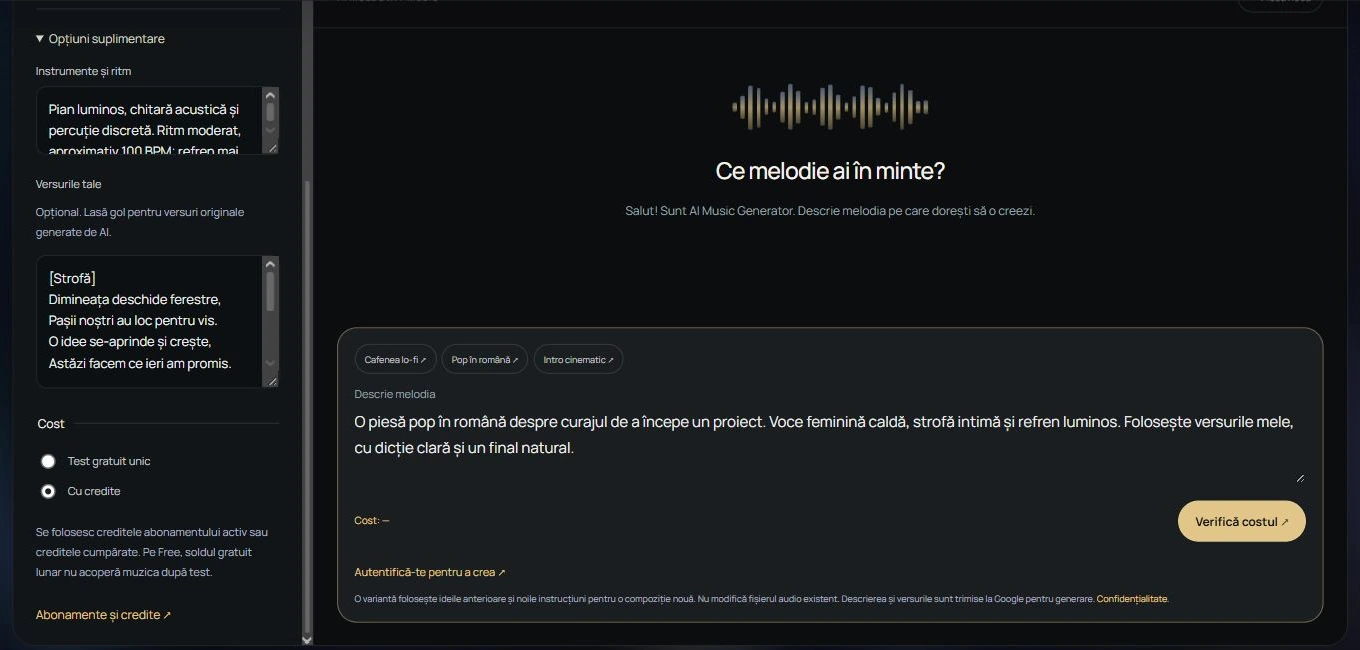
Open Additional options when you have more precise requirements. The instruments and rhythm field can describe piano, guitar, percussion, approximate tempo and how the arrangement should build. You do not need to fill every available character. Two clear instructions can be more helpful than a long list of competing terms. If you are unsure about BPM, describe a moderate pace, a relaxed feel or dance energy instead.
Enter the words you want sung in Your lyrics. Separate verses from the chorus and use short lines that are comfortable to pronounce. Keep the spelling of names and places consistent, then check them carefully when listening. If this field is empty for a vocal track, the system can propose original lyrics from your theme. For an instrumental, leave lyrics out and keep all the settings directed towards music without a voice.
6. Give a personal song one clear message
For a birthday, dedication or family project, choose a few details that genuinely matter: who the song is for, the feeling you want and the thought that should remain in the chorus. Too many names, dates and events can make the lyrics awkward to sing. Prefer two concrete images and one central idea. A simple, repeatable chorus gives the song a point of focus.
Adapt the description below, then place your own verse and chorus in the lyrics field. Keep production instructions separate from the words to be sung. Ask for a warm voice or an energetic delivery instead of copying a real artist's voice. Effective personalization comes from your message, language and story. It does not require imitating an existing recording or listing several unrelated styles in the same request.
A Romanian pop song about finding the courage to start a project. Warm female voice, bright piano, acoustic guitar and discreet percussion. An intimate verse and a more expansive, optimistic chorus. Clear diction, an easy-to-follow melody and a natural ending. Use the original lyrics I entered in the dedicated field.
7. Review access and cost before confirming
Complete the form and use Check cost. Read the estimate and confirm only when the settings make sense for your project. If you change the track format, lyrics or other options, review the updated configuration and price. Decide beforehand how many interpretations you want to explore. Listening to public examples and selecting an idea are different actions from requesting a personalized generation with your credits.
The available free test is one 30-second clip per eligible account with a verified email, within the trial budget. It does not renew daily. After the test, music uses credits from an active subscription or purchased credits. The Free plan's monthly free balance does not cover further music generation. Check current prices and availability in the studio and on the Plans page before confirming a request; the displayed estimate applies to the selected configuration.
8. Follow the existing request and listen with a purpose
Once you confirm, follow the progress shown in the studio. Do not submit the same idea repeatedly because the result has not appeared immediately. On returning to the page, check the personal library and the track's status. Use the available status check for a request in progress. Establish what happened to the current generation before deciding whether another composition is necessary.
Listen to the whole piece once before rewriting the prompt. On a second pass, assess the voice, rhythm, instruments and ending separately. For a narrated video, check that the music leaves enough room for speech. For a vocal track, pay attention to important words, emphasis and the clarity of the chorus. Try headphones and the phone speaker: a detail that works in one listening context may dominate another.
9. Change a small number of things in a new version
If the first direction appeals to you, describe what should stay and what should change. For example, keep the relaxed mood and piano but ask for quieter percussion and a simpler opening. Changing the genre, voice, tempo and theme together makes comparison difficult. Record one concrete observation rather than asking only for a better result. That observation becomes a useful instruction for the next attempt.
An AI Moldova variation uses earlier ideas and your new instructions to create a new composition. It does not precisely edit the existing audio file or guarantee the same melody with one adjustment. Each variation has its own cost, displayed before confirmation. If you only need to trim two seconds or lower the volume, use an audio or video editor for that step instead of generating an entirely new piece.
10. Download the MP3 and organize your library
Completed results appear in Your latest tracks, the private library on the AI Music page. Listen in the player and use the MP3 download when the piece is ready. Rename tracks with a recognizable project and version description, such as Café — discreet piano or Birthday — bright chorus. Clear names let you compare alternatives without opening every file to remember what it contains.
Keep the prompt and your listening notes with the downloaded file. A clear description is useful when you return to an idea later. For video, import the MP3 into an editor and adjust volume, timing and the ending against the images. Your private library belongs to your account. The public example gallery is a separate collection for inspiration, not a list of your personal projects or a place where your tracks are automatically published.
A workflow you can repeat
Choose the purpose, listen to a few directions, write a coherent description and match the settings. Add lyrics only when needed, review the estimate and confirm one request. After listening, keep what works and change one specific requirement. This process helps you learn from each result and use your credits for meaningful comparisons rather than several nearly identical attempts with no clear evaluation criteria.
As the platform operator, we recommend starting with your own ideas and lyrics you are entitled to use. For a commercial project, read the conditions displayed on AI Moldova; a generation is not a guarantee of exclusive rights. Music can become part of a story, a product presentation or a personal occasion. Open the studio with one clear question: what should the person listening feel?
Start with the sound you imagine
Open the studio, describe your idea and review access and cost before generating. Your tracks are stored in the private My music library.
Generate musicOfficial sources and further reading
Details used in “How to create music on AI Moldova: a practical guide to prompts, lyrics and MP3” may change. Check the official source before making a technical or commercial decision.