AI video generation on AI Moldova: from text and photos
Video generation is now available on AI Moldova. Describe an idea or upload a photo, review the credit estimate and bring your imagination to life.
Your ideas can now move
We have integrated video generation into AI Moldova. You can now start with a few sentences or a photograph and create a video directly in the platform. Describe the scene, choose the available options and review the estimated cost before submitting. The feature is designed for creative ideas, social posts, product presentations and early campaign concepts. You do not have to begin with a filmed sequence or a complex editing project. You can begin with the scene you want to show.
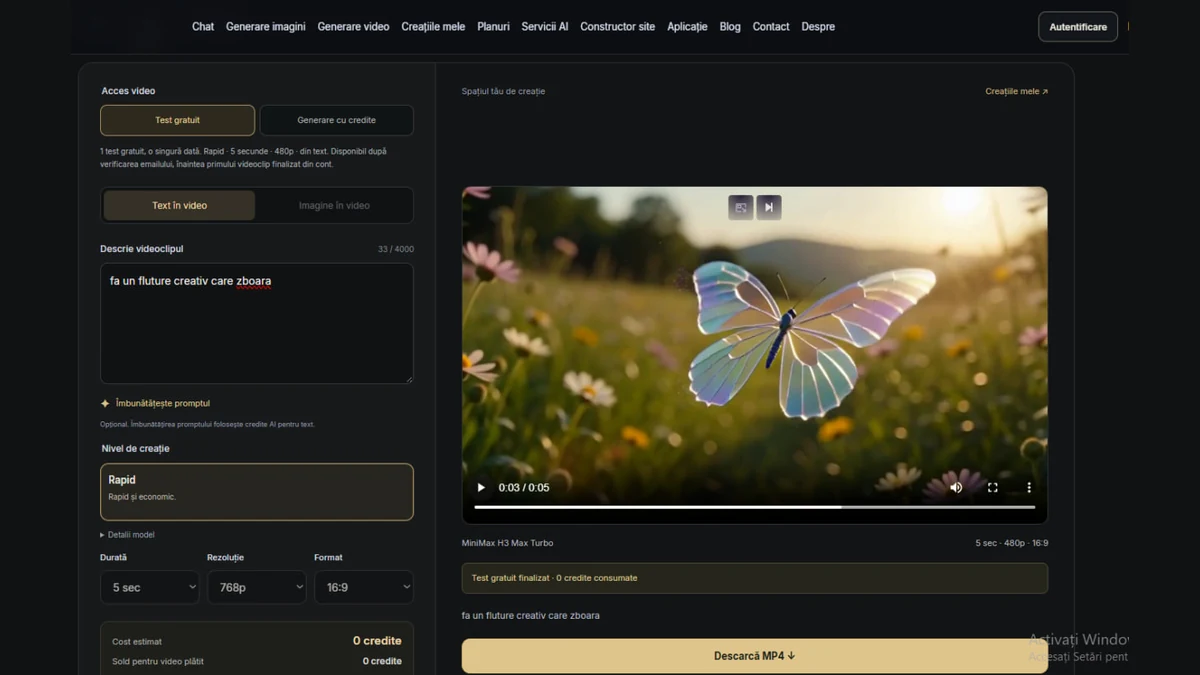
The image in this article captures an example from the AI Moldova interface: a butterfly with iridescent wings in a sunlit meadow. It is a screenshot of a video result, rather than an interactive player embedded in the article. It illustrates the purpose of the feature: turning a simple idea into a visual scene you can preview, download and develop further. Every generation can produce a different result, and the description you provide makes a meaningful difference.
Two starting points: text to video and image to video
In Text to video, your description establishes the starting point. You might request a landscape, a product scene, an evening atmosphere or a fantasy concept. Explain what appears in the frame, what moves and how the light should look. A concrete description gives the model more direction than a broad request such as “make something beautiful”. For a first attempt, a single scene and one simple action are enough to explore whether the idea works.
In Image to video, upload the photograph you want to start from and describe the movement. This could be a product photo, a composition you created earlier or an image for a campaign. The mode uses the compatible Quality option. Your image supplies a visual reference, but the model can alter details. Check labels, shapes and faces before publishing. Animating a photograph uses paid credit access; it is separate from the free text-only video trial.
Create your first video, step by step
Open Video generation from the website menu or select Generate video on the chat welcome screen. Sign in to your account, then select the access available to you: the free trial, if eligible, or generation with credits. Choose Text to video or Image to video and enter a description. When using a photograph, upload it in the dedicated area, following the accepted file types and size limit shown there. You do not need to send it to the chat for this workflow.
Choose a creation level and the settings supported by that model: duration, resolution and aspect ratio. Review the updated estimate and available balance before generating. After submission, follow the progress in the studio. You can leave the page and return later because processing continues on the server and the result is linked to your account. When it is ready, preview the video and use Download MP4. Your phone screen does not have to stay on throughout the entire processing period.
A useful prompt describes both the scene and the action
Build a description around five elements: subject, action, setting, light and camera movement. For example: “An iridescent butterfly flies slowly above a flower meadow. Warm sunset light passes through its wings, the background is softly blurred and the camera follows smoothly from close range. Realistic appearance, no text in the frame.” This gives the model a concrete direction while keeping one main action. It leaves room for visual interpretation without asking for too many competing events at once.
For a product, try: “A perfume bottle on a black surface with subtle reflections. The camera moves slowly closer, side lighting reveals the glass and the background stays simple. Premium advertising style, no hands and no added lettering.” If the result feels crowded, shorten the prompt and remove secondary details. Change one element in the next version so you can identify what improved the scene. A focused iteration is usually more informative than rewriting every instruction at the same time.
Bring movement to a photograph
Choose a clear, well-lit image suited to your intended format. A distinct subject and an orderly background make the motion easier to describe. Upload the photograph, then explain the change you want rather than describing the entire picture again. For example: “Preserve the composition. The camera moves very slowly towards the product, fine reflections appear on the packaging and the background remains stable.” A small movement can work better than trying to transform every object in the photograph simultaneously.
For landscapes, explore gently moving clouds, leaves or a slow camera move. For objects, test lighting, a new angle or a subtle rotation. Treat instructions such as “preserve exactly” as creative guidance rather than a technical guarantee. Review the generated material carefully. If product identity or a commercial detail is essential, compare the video with the original image and add final text in an editor where you can control the spelling, position and legibility.
Rapid, Quality or Pro: choose for the project
AI Moldova presents three creation levels with options adapted to the available models. Rapid is the economical route for text-based ideas and short experiments. Quality balances cost and output and includes Image to video. Pro supports exploration of scenes with a cinematic direction. The levels do not all provide the same durations, resolutions or aspect ratios. The interface displays supported choices for the selected combination. Check current availability rather than assuming every option will always be offered together.
A higher price does not replace a well-defined idea. Start with a simple frame and a short duration, then allocate more budget to a direction worth developing. Audio can be available on certain models and can change the estimate. Do not assume every video includes music or speech. Select the displayed options explicitly and prepare the message, captions and final edit separately when developing a campaign. This makes the creative process easier to review and the spending easier to control.
Accessible creation with the estimate shown upfront
We want video generation to be easy to try and budget for. That is why the credit estimate appears before you start. Usage depends on the model, duration, resolution and extra options, including audio where supported. There is no single price for every video and no fixed generation count that ignores those settings. The estimates on the plans page help compare scenarios; the estimate in the studio reflects the combination you currently selected. Review it again whenever you adjust an option.
Paid generations can use credits from an active paid plan or separately purchased credits. A subscription budget is shared with other eligible features, so chat, document and image use affects what remains for video. Free monthly credits and free referral rewards do not fund paid video generations. If you only use video occasionally, a credit pack may suit your workflow; for regular work, compare the available plans. Plan payments cover thirty days and do not renew automatically. Choose according to your expected use.
One free trial for a verified account
You can explore the feature with one free video trial after signing in and verifying your email address. The trial is available once during the lifetime of the account, before its first completed video. It uses fixed settings: Rapid, five seconds, 480p and text input. This is not a daily allowance and it does not return next month. Availability also depends on the video service and the platform’s shared free budget. The interface shows your eligibility before you submit a request.
After the first completed video, continuing requires an active paid plan or purchased credits. To animate a photograph, change models or select different settings, use generation with credits. The optional prompt improvement feature consumes AI text credits and is separate from the free video trial. You can therefore decide whether to write the description yourself or use assistance to refine it. Review an improved prompt before submitting it, because the intended subject and movement should still match your idea.
Practical ideas for Moldovan businesses and creators
A café in Chișinău might prepare a short scene of steam rising from a cup for a morning offer. A shop can explore a product presentation for a social post, while a creator can turn an illustration into a portfolio sequence. Tourism projects can use the tool to develop the atmosphere of a landscape or a visual concept for a destination. When promoting a real place, use authentic references and avoid presenting invented scenery as documentary evidence of what visitors will find.
For local communication, think about the audience and channel first. A website display may need a horizontal frame, while a phone-focused post may use a supported vertical format. Keep the message short and adapt the final wording into Romanian, Russian or English for the intended audience. Add offers, prices and contact information during editing, where spelling and readability are easier to control. A clear message connected to a real offer matters more than an elaborate scene with no obvious purpose.
From an initial version to a publishable asset
Treat the first generation as a working version. Check movement, object consistency, frame edges and details that matter to the project. For a product advertisement, inspect the packaging shape and any changes to the label. When people appear, review expressions and hand movement. Identify what works, adjust the description and create another version only after reviewing its cost. Each extra generation is a separate request. Comparing versions deliberately is more useful than submitting the same uncertain idea several times in a row.
After downloading, combine the sequence with other shots, add a title and adapt the length to the chosen channel. A short clip can be a useful starting point for an advertisement, but it does not automatically replace a complete campaign. Sound, visual identity and commercial wording deserve as much attention as the image. For a modest budget, a few well-chosen seconds with clear copy can be more useful than several scenes that do not share a single coherent idea.
Results stay connected to your account
My creations brings together the generations linked to your account, including progress and available results. You do not have to search another application for the original prompt to continue an idea. You can revisit a request and prepare a new variation from its settings. Download important assets to your device as well: the gallery is a working space and should not be the only copy of files that a project depends on. Keep a suitable backup alongside your final campaign materials.
When the service cannot complete a generation, reserved credits for the failed request are returned automatically according to its processing status. A disconnected browser does not necessarily mean the job stopped. Check progress before submitting again. For an existing result, use its preview and download option to verify the asset. If you need support, provide the request identifier without card details or unrelated sensitive information. This helps the team investigate the right generation while keeping the conversation focused on the problem.
Turn your imagination into a first video
Use photographs you own or material for which you have the necessary rights and permissions. Avoid uploading confidential documents or using someone’s face in a misleading context. Before commercial use, review the output, platform terms and the requirements of the channel where you plan to publish it. Present creative work honestly. When the context requires it, explain that a scene is generated or illustrative rather than a recording of an actual event. This is part of preparing a professional final asset.
The new feature adds a natural next step to AI Moldova’s chat, images and documents: movement. Describe an idea, attach a photograph when you want to begin with something of your own and explore a version you can actually watch. You do not need a perfect prompt to begin, only a clear subject and some curiosity. Open the video generator, review your access and the estimate, and give your imagination its first moving frame. You can refine the next version from there.
Start with your idea
Write a description or start from a photograph. Review your access and the estimate before generating.
Generate a video